Published 2013-08-11 ·2 min read
WWW Redirection with .htaccess
To force a 301 redirect from non-www to www (or the other way) on Apache, add a RewriteRule to your .htaccess file in the site’s root folder. The redirect prevents duplicate content in Google, consolidates PageRank, and stops inbound link popularity from being split between two versions of your domain. Use the version-with-www OR the version-without-www consistently, never both.
Why www redirection matters for SEO
Performing a correct domain redirection from the domain without WWW to the domain with WWW or vice versa has certain advantages for SEO:
- Prevents duplicate content problems in Google
- Prevents possible PageRank fragmentation between subdomains
- Prevents fragmentation of inbound links popularity
- It gives your website general consistency
If your domain has already been indexed by Google without the WWW you may lower your PageRank temporarily when applying changes. In any case, as you indicate in the code that it is a 301 permanent redirect, Google will soon pass all your PageRank and inbound links to the new domain.
The .htaccess file
A permanent redirection can be created with the .htaccess file. It is a hidden file located in the root folder of your website, so you’ll have to activate the “view hidden files” option in your FTP client preferences.
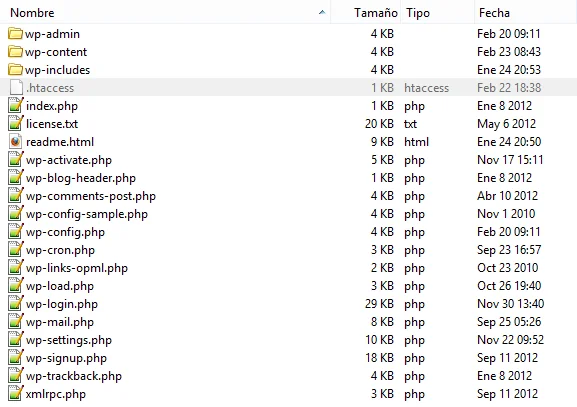
The .htaccess file in the root folder of a WordPress website
The redirect code
Non-www to www
If you use the following code in your .htaccess file you will create a permanent 301 redirect from the domain without WWW to the domain with WWW:
RewriteEngine On
RewriteCond %{HTTP_HOST} !^www\.
RewriteRule ^(.*)$ http://www.%{HTTP_HOST}/$1 [R=301,L]
www to non-www
On the other hand, if you use the following code the redirection will be from the domain with WWW to the domain without WWW (replace “yourdomain” and “.com” for your domain name and the TLD of your Website):
RewriteEngine On
RewriteCond %{HTTP_HOST} !^yourdomain\.com$ [NC]
RewriteRule ^(.*)$ http://yourdomain.com/$1 [R=301,L]
Key takeaways
- Always pick one canonical version (www or non-www). Both versions live = duplicate content.
- Use a 301 (permanent) redirect, not 302. Only 301 passes PageRank.
.htaccesslives in the root folder of your site. Enable “show hidden files” in your FTP client.- Expect a temporary PageRank dip if you switch versions on an indexed site. Google reconciles it within weeks.
- For HTTPS sites, also redirect HTTP to HTTPS in the same
.htaccessblock.
FAQ
Should I use www or non-www?
Either works for SEO. Pick the one that matches your branding and stick with it. Bigger brands tend to use non-www (e.g. github.com); some legacy sites prefer www. Just don’t serve both.
Is a 302 redirect okay instead of 301?
No. 302 is a temporary redirect and does not pass PageRank consistently. For canonical version redirects, always use 301.
Does this work on Nginx?
No. .htaccess is Apache-specific. On Nginx, configure the redirect in your server block with a return 301 directive.